
Set up an automated acknowledgement (SMS or email) and a short digital intake form that feeds your CRM today. That single step holds the lead, starts a timestamped audit trail, and buys time to complete identity verification where required under Australia's AML/CTF Act 2006. For regulated firms, AUSTRAC expects a documented, repeatable process, not a folder of PDFs.
Pro Tip: A missed-call text-back sent within 20–30 seconds dramatically reduces lead loss for field teams. Keep the message short: confirm you received their call, set a realistic callback window, and include a link to your intake form. That reply does three things at once: it holds the lead, sets expectations, and starts your audit trail.
Table of Contents
- Why does a fast, structured intake win more jobs?
- What does Australian compliance require of your intake?
- What fields should your intake form actually ask for?
- How does the end-to-end automation workflow run?
- How long does implementation take and what does it cost?
- Are you ready to go live? Run this checklist first
- How do you keep sensitive client data secure beyond compliance?
- How do you train staff to use the intake system consistently?
- Which payment and contract integrations matter for Australian services?
- Key takeaways
- The intake system is where your business reputation starts
- Munyal builds your intake system so you don't have to
- Useful sources and further reading
Why does a fast, structured intake win more jobs?
Australian service businesses lose jobs before they ever quote. The reason is almost always the same: slow or missing responses hand the job to whoever replies first. Speed matters more than polish.
A structured intake compounds that advantage. When a prospect submits a form, you collect the right information immediately, which means your quote is faster, more accurate, and less likely to generate back-and-forth. That efficiency signals professionalism before you've set foot on site.
The business impact shows up in three places:
- Revenue: Fewer leads fall through the cracks between enquiry and quote.
- Reputation: Clients who feel acknowledged quickly leave better reviews and refer more often.
- Staff time: A structured form replaces a 20-minute phone triage call with a two-minute form review.
Consider a plumber who misses a call at 10 AM on a job. A competitor answers and books the work. With a missed-call text-back in place, that same plumber sends an instant SMS, the prospect clicks the intake link, and by noon the plumber has a completed job brief waiting. Same missed call, completely different outcome.

What does Australian compliance require of your intake?
If you provide designated services under the Anti-Money Laundering and Counter-Terrorism Financing Act 2006, your intake must be a documented, auditable process tied to your AML/CTF programme. This is not optional.
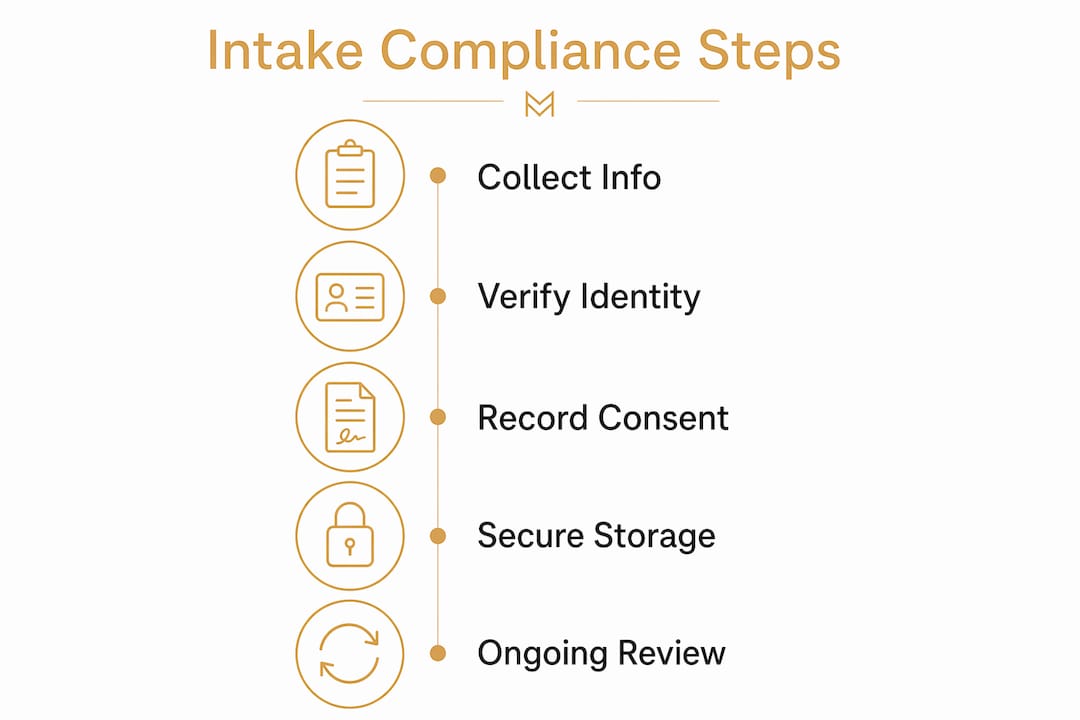
Tranche 2 AML/CTF reforms extend these obligations to many professional services, including accountants, lawyers, and bookkeepers. The core requirements are: enrol with AUSTRAC where applicable, verify client identity before commencing work, document every verification step, and retain records for a minimum of seven years.
Email is inadequate for regulated firms. Secure portals with timestamped audit trails, role-based access, and Australian data residency are the accepted practice. A PDF emailed back and forth has no chain of custody and no proof of receipt.
Practically, collect full legal name, ABN or ACN, contact details, and identity document type at sign-up. Enhanced due diligence information, such as source of funds or beneficial ownership, can follow once the relationship is confirmed. Pause work until identity verification is complete for any regulated engagement.
AUSTRAC publishes onboarding and CDD forms for individuals, sole traders, body corporates, trusts, and government bodies. Use these as your baseline.
What fields should your intake form actually ask for?
Use a digital form with 12–15 fields, conditional logic, and secure uploads for identity documents when required. A well-designed form typically takes 10–15 minutes to complete and replaces hours of back-and-forth.
Eight core fields every service business needs:
- Full legal name and preferred name
- Email address and mobile number
- Service required (dropdown or short description)
- Preferred timeline or urgency level
- Site or service address
- How they heard about you
- Budget range (optional but useful for quoting)
- Consent and privacy acknowledgement checkbox
Industry-specific additions:
| Business type | Additional fields |
|---|---|
| Trades (plumber, electrician, HVAC) | Site access details, photos of the problem, property type |
| Bookkeepers / accountants | Accounting software in use, ABN, current BAS agent details |
| Salons | Service history, product sensitivities, preferred stylist |
| Legal / conveyancing | Matter type, relevant dates, existing representation |
For regulated firms, add: identity document type, document number, and a consent checkbox for identity verification. Mark these as required fields and gate form submission until they are complete.
Keep PDFs out of the collection process. A digital form with conditional logic, where trade-specific fields only appear for trade clients, keeps completion rates high and data clean.
How does the end-to-end automation workflow run?
The sequence is: capture → acknowledge → verify → contract → onboard. Each stage has a trigger that advances the process automatically.
A complete onboarding workflow covers structured intake, automated contract dispatch, CRM population, sequenced welcome messages, and an internal handoff brief. Here is how each stage connects:
- Missed call or web form submission triggers an immediate SMS or email acknowledgement with the intake form link.
- Form submission triggers a KYC document request (for regulated clients) and dispatches the engagement letter or quote via e-signature.
- E-sign completion triggers CRM record creation, accounting system contact setup, and an invoice or deposit request.
- Payment confirmation triggers the welcome sequence: onboarding email, calendar invite, and internal staff notification.
Integration types that support this flow include CRM platforms (for contact and deal management), accounting software (for invoice triggers), e-signature tools, booking and calendar systems, and secure document portals for identity uploads.
Pro Tip: Tell clients upfront that their intake is handled by an automated system and that a real person reviews every submission. That single line removes friction, sets expectations, and preserves the human tone your business has worked to build.
How long does implementation take and what does it cost?
A basic automated intake can be live within days. A fully integrated workflow, with CRM, accounting, e-signature, and a secure document portal, typically takes 2–6 weeks depending on integration complexity.
| Build type | Timeline | What's included |
|---|---|---|
| Quick-start | 1–3 days | Missed-call text-back, basic intake form, email acknowledgement |
| Standard build | 2–4 weeks | Digital form, CRM mapping, e-sign, welcome sequence |
| Integrated build | 4–8+ weeks | Full KYC workflow, accounting integration, secure portal, custom UI |
Cost drivers include the number of integrations, custom KYC steps, client volume, and whether you need bespoke design. Automated onboarding workflows can be scoped and deployed within a few weeks for most professional services firms; it is integration complexity that extends timelines, not the core automation logic.
Measuring ROI is straightforward: track lead-to-quote conversion rate before and after, measure time saved per new client, and note how quickly you issue your first invoice. Most businesses recover the setup cost within the first month of reduced admin alone.
Are you ready to go live? Run this checklist first
Test the full end-to-end path as a client would before switching off any manual fallbacks. Check audit logs and staff notifications at every stage.
- Submit a test enquiry via missed call and confirm the SMS fires within 30 seconds
- Complete the intake form and verify all fields map correctly to your CRM
- Upload a test identity document and confirm secure receipt and access controls
- Trigger the e-sign flow and confirm the document arrives and records completion
- Confirm the welcome sequence fires after e-sign and that staff receive the internal handoff notification
- Check that payment triggers an invoice in your accounting system
- Review the audit log to confirm timestamps are captured at each stage
- Assign a named staff member to review flagged KYC submissions daily
A simple onboarding checklist reduces time-wasting quotes and improves client fit from day one.
Pro Tip: Run a 48-hour soft launch with live staff monitoring before removing manual fallbacks. Pick two or three real enquiries to process through the new system while keeping your old process as a backup. Fix what breaks before it affects a paying client.
How do you keep sensitive client data secure beyond compliance?
Compliance sets the floor, not the ceiling. Encryption at rest and in transit, role-based access controls, and a documented data retention and deletion policy are standard practice for any service business handling personal information under the Privacy Act 1988.
Store identity documents in a dedicated secure portal, not in email threads or shared drives. Limit access to staff who genuinely need it, and log every access event. Set an automatic deletion schedule for records that have passed their seven-year retention window.
For trades and salons handling less sensitive data, the practical minimum is: a password-protected form platform, no client data stored in personal email accounts, and a clear policy for what happens to data when a client relationship ends.
How do you train staff to use the intake system consistently?
A system is only as reliable as the people running it. Assign one person as the intake system owner, responsible for reviewing flagged submissions, monitoring the audit log weekly, and escalating anything unusual.
Run a 30-minute walkthrough with every staff member who touches the intake process. Cover: how to find a submitted form in the CRM, how to action a flagged KYC submission, what the escalation path looks like, and how to manually trigger a follow-up if automation fails.
Document the process in a one-page internal guide. When staff turn over, that guide is what keeps the system running without retraining from scratch. Review it every six months and update it whenever an integration changes.
Which payment and contract integrations matter for Australian services?
The integrations that move the needle for Australian service businesses are e-signature (for engagement letters and contracts), accounting software (for invoice and payment triggers), and a payment gateway that supports Australian card processing.
DocuSign and Adobe Acrobat Sign are widely used for e-signature in Australian professional services. Xero and MYOB are the dominant accounting platforms; both support webhook-based triggers that can fire an invoice the moment a contract is signed. For payment processing, Stripe and Square both operate in Australia and integrate with most CRM and form platforms.
For trades, connecting your intake form to a quoting or job management platform, such as ServiceM8 or Tradify, means a completed intake form can pre-populate a job card automatically. That removes a manual data-entry step and reduces errors between what the client described and what appears on the work order.
Key takeaways
A fast automated acknowledgement combined with a structured digital intake is the single highest-leverage change an Australian service business can make to stop losing leads and start building a defensible compliance record.
| Point | Details |
|---|---|
| Speed wins leads | Slow or missing responses hand jobs to faster competitors; automate the first reply within 30 seconds. |
| Retention of records for several years is mandatory | Regulated firms must retain client identity and verification records for a minimum of seven years under AML/CTF law. |
| Digital forms outperform PDFs | A digital form with a dozen or so fields and conditional logic improves completion rates and feeds your CRM automatically. |
| Implementation is faster than you think | A basic automated intake can be live in a few days; a fully integrated build takes several weeks. |
| Munyal builds it for you | Munyal designs and maintains bespoke enquiry-response and intake systems for Australian service businesses, including missed-call text-back and CRM integration. |
The intake system is where your business reputation starts
Most service businesses treat intake as admin. It is not. The first automated touchpoint a prospect receives is effectively their first real experience of your business. A chaotic manual process, a missed call with no follow-up, a PDF emailed back and forth with no audit trail, signals a lack of care before you have done a single minute of work.
The businesses I see winning on lead conversion are not necessarily the most polished or the most expensive. They are the ones who respond first and make the next step obvious. An immediate SMS, a clean form, a prompt quote. That sequence builds trust faster than any brochure.
The compliance angle is worth taking seriously too, even if you are not yet a designated reporting entity under Tranche 2. Building a documented, repeatable intake process now means you are not scrambling to reconstruct records if your obligations change or if a client dispute arises. A timestamped audit trail is cheap insurance.
The craft in building these systems is in preserving the business voice. Automation should feel like the business, not like a generic chatbot. Every message, every form, every follow-up sequence should sound like the person who built the business, because that is what clients are actually choosing when they pick up the phone.
Munyal builds your intake system so you don't have to
Every lead you miss while you're on the tools is revenue that walks to a competitor. Munyal builds bespoke enquiry-response and new client intake systems for Australian service businesses, including trades, salons, and small professional practices, so the follow-up happens automatically while you work.

A typical Munyal system includes missed-call text-back, a digital intake form tailored to your services, CRM integration, automated welcome sequences, and monthly support to keep everything running. Each system is built personally by Tyson Kaye to match your business voice, not a generic template. For trades specifically, Munyal's AI systems for trades connect enquiry capture directly to your quoting and job management workflow.
Ready to stop losing leads to voicemail? Get in touch with Munyal to discuss what a done-for-you intake system looks like for your business.
Useful sources and further reading
The following primary and practical references underpin the compliance and implementation guidance in this article. Consult a qualified compliance professional before finalising your AML/CTF programme.
- AUSTRAC Accounting Programme Starter Kit: Document Library — Primary legal reference; includes official onboarding and CDD forms for individuals, companies, trusts, and government bodies.
- Tranche 2 AML/CTF and Your Client Intake Process (Gatheroo) — Practical guide to Tranche 2 obligations, secure portal requirements, and seven-year record retention.
- KYC and Client Intake for Professional Services (Gatheroo) — Step-by-step KYC framework covering identification, verification, risk assessment, and review schedules.
- Client Intake Form Guide (Portico) — Practical guidance on form design, field selection, and completion-rate optimisation.
- Client Onboarding Workflow for Sydney Businesses (Bocati) — Stage-based onboarding workflow covering CRM, accounting, e-sign, and welcome sequences.
- Why Tradies Lose Jobs Before Quoting (Undercurrent Automations) — Analysis of lead loss from slow response in Australian trade contexts.
- Stop Losing Good Jobs: Checklist for Better Customers (LM Group) — Practical onboarding checklist for small service businesses focused on client fit and expectation-setting.
This article is general information only, not legal or compliance advice. Confirm your specific AML/CTF obligations with AUSTRAC or a qualified compliance professional before implementing your programme.